Introducing Smart Signal
Silent Guard • July 10, 2019

Silent Guard and our partners at Alarm.com continue to be on the leading edge of technology for our customers. We are excited to share with you the addition of Smart Signal to your Alarm.com app!


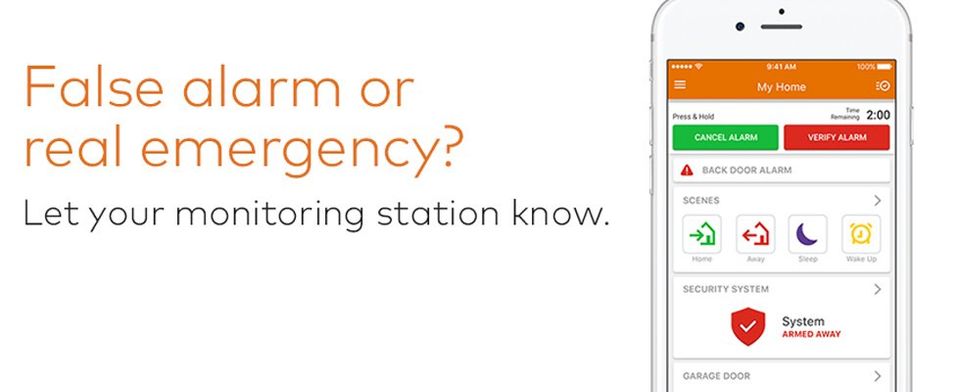
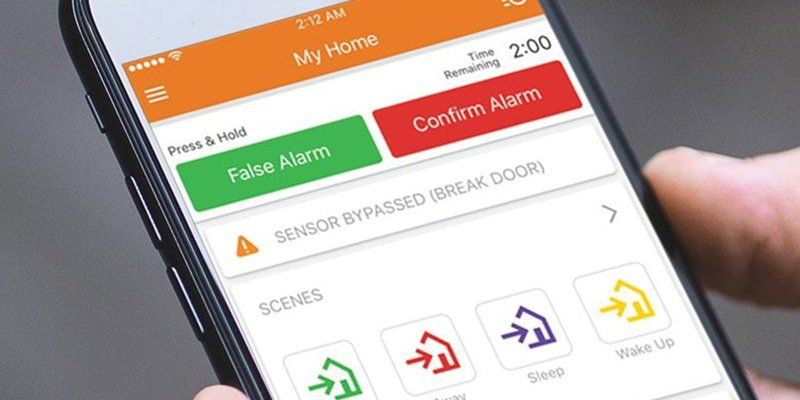
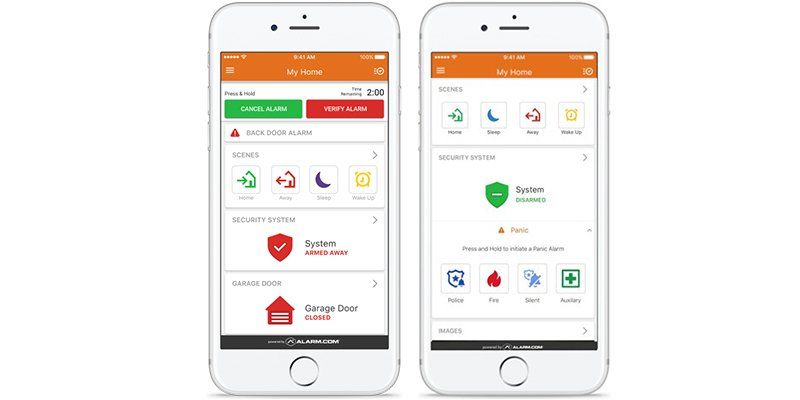
Smart Signal enhances your home's professional monitoring with a set of clear, simple emergency buttons in your Alarm.com app. These buttons let you quickly verify an alarm at your property to expedite emergency response, cancel a false alarm easily, or send a panic signal from your home or business if you discover an emergency yourself.


Because it's in your smartphone app, you don't have to be at your property to use Smart Signal. You can respond to an alarm from anywhere, using your app to check video feeds and images before verifying or cancelling. Streamlined, efficient and effective, Smart Signal reinforces your control, your safety and your peace of mind. 


Read more below and check out the attached video to learn more about these new features. 

To cancel an alarm using the Customer app:

  1. When the system is in alarm, log into the Customer app.
  2. Use the Time Remaining to quickly review video cameras or communicate with those at home.
  3. Press and hold Cancel Alarm for three seconds.
  4. A confirmation screen will pop-up to let users know the signal has been canceled.


To verify an alarm using the Customer app:

  1. When the system is in alarm, log into the Customer app.
  2. Use the Time Remaining to quickly review video cameras or communicate with those at home.
  3. Press and hold Verify Alarm for three seconds.
  4. A confirmation screen will pop-up to let users know the signal has been confirmed.


To trigger a panel panic from the Customer app:

  1. Log into the Customer app.
  2. In the Security System card, tap Panic.
  3. Press and hold the type of panic to be triggered.
  4. After three second countdown in which the panic can be canceled or immediately sent, it will successfully be sent to the monitoring station.
  5. Tap Close to wait for assistance or Disarm to disarm the panel.

Frequently Asked Questions

Cancel/Verify
  • Why use Cancel/Verify?

    The Cancel/Verify monitoring station supported feature has the potential to help reduce the number of accidental alarm dispatches made each year. A user can quickly resolve an alarm situation with the press of a button if the cause is known, accidental or emergency.


    Additionally, accidental dispatches can result in fines at all levels of accountability: users, dealer, and monitoring stations. Not to mention distracting emergency personnel from potential real emergencies. With the press of a button and without needing to wait for a call from a monitoring station, an entire situation can be resolved saving time and money.

  • When can Cancel/Verify be used?

    Whenever an alarm is triggered at the home location and the entry delay timer has elapsed, the alarm signal will be sent to the monitoring station, and the Cancel/Verify card will appear in the Alarm.com app. Cancel/Verify appears for all alarm events but will not appear in the app outside of an alarm event.

  • How long is Cancel/Verify active during an alarm?

    Cancel/Verify will remain active in the Alarm.com app until 2 minutes past the alarm signal was sent. 

  • What does the two minute counter represent?

    The two minutes is the estimated amount of time for a monitoring station to receive, process, act on, and dispatch based on an alarm signal or event. Response times vary between monitoring stations so a user's signal may be sent after dispatch has occurred while still in the two minute Cancel/Verify window. Monitoring stations will still receive the signal if sent before the time has elapsed and may adjust their response accordingly. This time varies between monitoring stations. Contact the monitoring station account rep to learn how they handle Cancel/Verify.

  • Are alarm signals held until a Cancel/Verify button is pressed?

    No. All alarm signals still send as expected and no communications are inhibited in any way. The user is able to interact with the Cancel/Verify buttons once the signal has been sent to and received by the monitoring station.

  • What happens when users press a button?

    When users press and hold either False Alarm or Confirm Alarm, a signal is sent from the Alarm.com app through Alarm.com’s backend to the monitoring station and communicates the selection. Depending at what stage the monitoring station is at with handling the original alarm signal, the selection may resolve situational concerns or may help influence post-dispatch communications between the monitoring station and the emergency personnel.


    When pressing False Alarm, a disarm signal is also sent to the panel indicating a safe environment, similar to disarming directly at the panel.


    Note: The disarm command in the Event History will list from which login name the disarm was sent

In-App Panic

  • What happens when the panic button is pressed?

    When the customer presses and holds any of the available panic buttons, a signal is sent from the Alarm.com app through Alarm.com’s backend to the monitoring station and communicates the selection. Another signal is sent simultaneously to the panel to register the command and trigger an audible alarm if applicable.

  • What if the customer sends a Panic by mistake?

    After pressing the panic button, a new screen pops up with a three-second countdown, below the countdown is a Disarm button. Tapping Disarm will negate the panic signal that was just triggered.

  • Will assistance be sent to the customer’s home location or their current geographic location?

    Sending a panic from with the In-App Panel Panic interface will act as if a panic is being sent from the panel. Messaging in the app will reinforce that when a signal is sent, emergency personnel will be dispatched to the home/panel location.


    Emergency personnel will not arrive to the customer’s geographic location. They will only go to the address listed on your monitoring station account. It is encouraged to keep that information up-to-date.

May 20, 2026
Managing a distribution center means managing constant movement.  Whether it's deliveries arriving, trucks leaving, employees moving throughout the facility, or inventory always in motion, without the right systems in place, it can be difficult to keep track of everything. That is where it is essential to have a well-designed security system to monitor the movement in and out of your space. Video surveillance and 24/7 monitoring give business owners real-time visibility into loading docks, storage areas, and all entry points. Access control systems for your business play a key role in operations. By managing who can enter specific areas, businesses can protect inventory, reduce internal risk, and create a more secure environment. For facilities handling high-volume shipments, integrating motorized gate operators helps manage incoming and outgoing traffic without slowing operations. For teams managing multiple locations, centralized monitoring makes it easier to oversee activities from a single location. This added visibility helps improve decision-making and keeps operations running smoothly. Silent Guard works with distribution centers across Kentucky to build commercial and residential security systems that are both practical and easy to use. From camera systems and video monitoring to access control and fire alarm integration, everything works together to support daily operations. Reach out today to build a system that protects your facility and supports your workflow.
April 20, 2026
Government buildings and public spaces are designed to be accessible, but that also creates unique security challenges. City offices, county buildings, libraries, and health departments often serve a high volume of visitors each day, making it difficult to manage who can access certain areas while keeping operations running smoothly. Without a clear system in place, sensitive spaces are easy to leave unprotected. Offices, filing rooms, and staff-only spaces all require a higher level of control to keep the employees, information, and the business safe for everyone. Silent Guard helps provide control access systems that create an effective solution to these concerns. Instead of relying on traditional keys, facilities can manage entry with keycards, mobile access, or secure credentials. This allows staff to move easily through approved areas while restricting access where it matters most. It also creates a record of who enters and exits the building, adding an extra layer of visibility. Silent Guard helps government and public facilities across Kentucky implement commercial access control systems designed for daily use. When paired with video surveillance and security monitoring, these systems create a more complete approach to building security.  If your facility needs a better way to manage access and improve security, Silent Guard is ready to help. Reach out today to learn how access control systems can support your building, your staff, and your community.
Gray metal sliding gate on tracks with small wheels, featuring vertical bars and a partial view of a white vehicle behind.
March 23, 2026
As a business manager, managing who enters and exits the property is part of the daily responsibilities. Distribution centers, utility providers, and industrial facilities often see a steady flow of trucks, employees, and deliveries throughout the day. Without a reliable system in place, keeping those entry points secure while maintaining efficiency can quickly become a hassle without the right technology.